
How Internet Fax Works: Practical Guidance for Modern Businesses
What Is Internet Fax?
Internet fax, often called online fax or e‑fax, is a service that converts a traditional fax document into a digital file and delivers it over the internet. Instead of relying on a phone line and a physical fax machine, users send and receive faxes through a web portal, email, or mobile app. This eliminates the need for paper, toner, and dedicated hardware while keeping the familiar fax workflow.
For organizations that still need to exchange documents with partners who require a fax, internet fax acts as a bridge between legacy processes and cloud‑based communication. The service is typically billed as a subscription, giving businesses predictable costs and the flexibility to scale up or down as needed.
Core Features of Modern Internet Fax Services
Today’s internet fax platforms offer a range of capabilities that go far beyond simply sending a PDF over a phone line. Understanding these features helps businesses determine whether a solution fits their workflow.
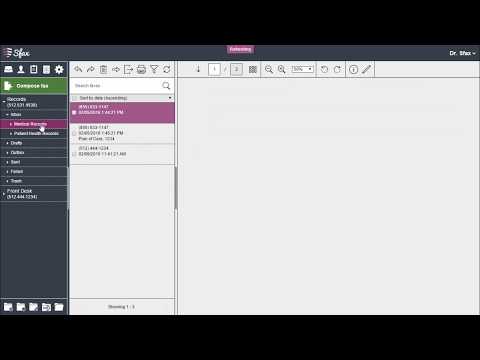
- Digital Dashboard: A central console where users can view sent and received faxes, track usage, and manage contacts.
- Email Integration: Faxes can be received directly in an inbox as attachments and sent by forwarding an email to a designated fax number.
- Mobile Apps: Access fax functionality from iOS or Android devices, enabling on‑the‑go document handling.
- Automation & Workflow: Rules that automatically route incoming faxes to specific folders, CRM records, or cloud storage services.
These features collectively improve productivity, reduce manual effort, and align faxing with broader digital transformation initiatives.
How Internet Fax Works – The Technology Behind It
At its core, internet fax uses the same telecommunication standards (like T.38) to transmit fax data over IP networks. The process can be broken down into three key steps:
- Conversion: When you send a fax, the document is converted into a digital image (usually PDF or TIFF) within the service’s server.
- Transmission: The digital image is sent over the internet to the destination’s fax gateway, which then translates it back into a signal compatible with traditional fax machines if needed.
- Delivery: Received faxes are stored in the provider’s cloud, and you are notified via email, dashboard alert, or mobile push notification.
This workflow eliminates the reliance on analog phone lines, reduces latency, and provides an audit trail for compliance purposes. Because the data travels over secured internet connections, it can also be encrypted for added security.
Common Use Cases and Business Benefits
Internet fax is especially valuable in industries where fax remains a regulatory requirement, such as healthcare, legal, and finance. Below are typical scenarios and the associated benefits:
- Sending patient records securely to hospitals while maintaining HIPAA compliance.
- Delivering signed contracts to partners who only accept faxed documents.
- Processing insurance claims that require faxed claim forms.
- Managing purchase orders and invoices with vendors that still operate fax‑only systems.
Beyond compliance, businesses enjoy reduced paper waste, lower operational costs, and faster turnaround times because faxes can be sent instantly from a desktop or mobile device.
Setting Up Internet Fax for Your Organization
Implementing an internet fax solution is straightforward, but a clear setup plan helps avoid disruptions. Follow these steps to get started:
- Choose a Provider: Evaluate vendors based on features, security certifications, and pricing.
- Configure Your Account: Set up user roles, assign fax numbers, and customize notification preferences.
- Integrate with Existing Tools: Connect the fax service to your email, document management system, or CRM using provided APIs or built‑in connectors.
- Train Staff: Provide quick tutorials on sending, receiving, and managing faxes through the dashboard or mobile app.
- Test the Workflow: Send test faxes to internal and external recipients to verify reliability and security settings.
Most providers also offer a trial period, allowing teams to evaluate the solution before committing to a long‑term plan.
Pricing Models and Cost Considerations
Internet fax pricing typically falls into three categories: pay‑as‑you‑go, monthly subscription, and enterprise plans with volume discounts. When comparing options, look beyond the headline price and consider included fax pages, overage fees, and additional features such as API access.
| Plan | Monthly Cost | Included Fax Pages | Key Features |
|---|---|---|---|
| Basic | $9.99 | 100 inbound/outbound | Email integration, mobile app |
| Professional | $24.99 | 500 inbound/outbound | API access, automation rules, enhanced security |
| Enterprise | Custom | Unlimited | Dedicated support, advanced compliance, multi‑user dashboard |
Remember to factor in any hidden costs such as per‑page overage charges or premium support fees. For organizations with high fax volumes, negotiating a custom enterprise agreement often yields the best value.
Integration, Automation, and Workflow Tips
To maximize the return on investment, integrate your internet fax service with the tools you already use. Common integrations include:
- CRM systems (e.g., Salesforce, HubSpot) for attaching received faxes directly to customer records.
- Cloud storage platforms (e.g., Google Drive, OneDrive) to archive faxes automatically.
- Electronic signature services for completing contracts that begin as faxes.
Automation can also reduce manual handling. Set up rules that route incoming faxes to specific departments, trigger email alerts for urgent documents, or automatically convert faxes to searchable PDFs. These capabilities support scalable workflows and help meet business needs without adding complexity.
Security, Reliability, and Support
Security is a top priority for any internet fax solution, especially when handling sensitive information. Look for providers that offer:
- End‑to‑end encryption for data in transit and at rest.
- Compliance with industry standards such as HIPAA, GDPR, or ISO 27001.
- Two‑factor authentication for user access.
Reliability is measured by uptime guarantees and redundancy in the provider’s infrastructure. A robust service will have multiple data centers and failover mechanisms to ensure continuous operation. Finally, responsive support—whether via phone, chat, or ticketing—helps resolve issues quickly and maintain workflow continuity.
Choosing the Right Provider – Decision Checklist
When evaluating options, use this checklist to compare providers objectively:
- Does the service support the required number of fax pages and users?
- Are the security features aligned with your industry regulations?
- Is there an API or native integration with your existing software stack?
- What are the total cost of ownership and potential overage fees?
- How does the provider’s support SLA match your business’s uptime requirements?
By answering these questions, you’ll identify the solution that best balances features, pricing, and reliability. If you’re ready to explore options, consider checking out the best internet fax provider directory for curated recommendations.